

Phishing emails are dangerous and can give us major headaches if we become a victim to one of their campaigns. In order to combat the frequency of such attacks, Jellie Tech has made a quick list of 10 identifying marks of a phishing email.
Step Number 1: Verify the sender email address
Phishing emails may not always be obvious. If an email had gibberish for a sender email address or a subject line with symbols all of us would know something is not right. Cybercriminals know this about us so they will mask the sender email address to look like a name we might trust or ever make it look like the email came from a company.
The first thing to do is examine the sender email address for any small typos. For example, an email from Jellie Tech would look like support@jellietech.com. Phishing emails may add or omit one letter so when you quickly read the address your mind makes it look legitimate. Therefore, a phishing email may adjust that email to read something like this: support@jelietech.com.
Did you see the change right away? If you didn’t, your mind probably read it fast enough for it to look the same. That is the point, slow down when examining the sender email.
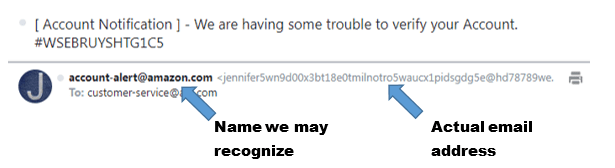
Another trick cyber-criminals will use is assigning a name to the email address instead of a long email address. In the example below, the sender made the name look authentic and something we would be familiar with. When we look at the actual email address, however, we see that this email did not originate from Amazon. To not get caught in a phishing email is to look carefully at the sender name and their actual email address.
Step Number 2: Look but do not click
A phishing email will include a button or a link that they want you to click. Do not click that link! Instead, hover your mouse over the button to see where the link will send you. In our example email, the button takes me to a tracking website.
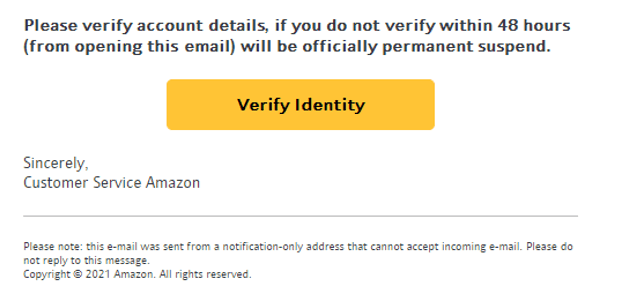
Step 2 is hover over but do not click on the link in the email and verify if it sends you to the real company’s website.
Step Number 3: Check grammar
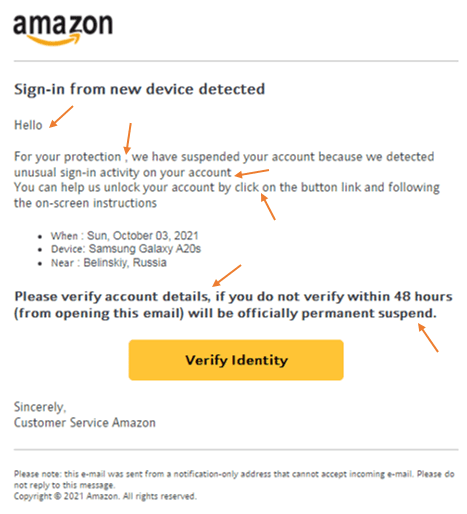
If you are still unsure after the first two steps then look at the email text and see if there are any grammar errors. Errors are an indication that the email is not safe. Company emails are proofread and corrected and follow a template so that they look and sound professional. Let us look back at the sample email I received. Below are some noted grammar errors. Even short emails like the one I received can be full of grammatical errors that should be a red flag.
Step Number 4: Examine the greeting
If the greeting is not one that is customary for your location it could have been sent from someone in another country. Though not entirely a red flag, it will help you determine if the email is real.
Step Number 5: What do they want?
If the email is asking for personal information then be very cautious. Rarely would a company ask for personal information via email. In our sample email the sender wanted me to verify my identify. That is a big red flag. Additionally, clicking a link may seem harmless but like noted earlier it can have lasting repercussions. The email I received would have taken me to a tracking website in addition to having me put in some basic information.
The point is, be very careful with what the sender wants from you. If you have doubts call the company directly and verify that the email you received was legitimate.
Step Number 6: Email Priority
Is the email marked urgent? Do they have a deadline for action to be taken? The email I received specified I have 48 hours to verify my identity. Cybercriminals know they have only a small window of opportunity so they will pressure you to act fast. They are aware that any moment a security company could shut down their website or link or release security patches to protect people. They will word the email in a way that gets you anxious so that instead of looking at all the warning signs you will fall into their trap. When you get a phishing email do your best to keep calm and follow all the steps outlined in this article.
Step Number 7: Email Signature
Most legitimate senders will have a full signature block at the bottom of the email. If the signature block is empty or has just a couple details then this is another indication that it may be a phishing email.
Step Number 8: Attachments
Never download and open unverified attachments. Cybercriminals will make the attachment look legitimate with an interest-arousing name. This is all designed to get you to download and open the file. Often times this is a virus that steals your information, destroys your computer or worse, hold your files ransom. It can be disguised by having a file logo of common program so you are more likely to open the attachment. Never click on attachments if you notice any of the signs we have pointed out in this article.
Step Number 9: Be Cautious
If any of these indicators concern you then it is better to be safer than sorry. Even if an email is actually safe it is always good to exercise caution and apply the steps we outlined in this article. If you are still not sure then…
Step Number 10: Contact Jellie Tech
If you need more help or would like Jellie Tech to help you personally with your emails then we encourage you to reach out to us.
Conclusion
Phishing emails can do lasting harm if we are not careful. Follow these few steps to greatly increase your knowledge and lessen your risk of a phishing email attack. Jellie Tech has made a brief free downloadable PDF file to stick beside your computer in case you need to reference it quickly.
Don’t miss an article when it’s published by following and subscribing for email updates!
Tell us what you think of the article by commenting below!
 Jellie Tech